
What Available Choices Does
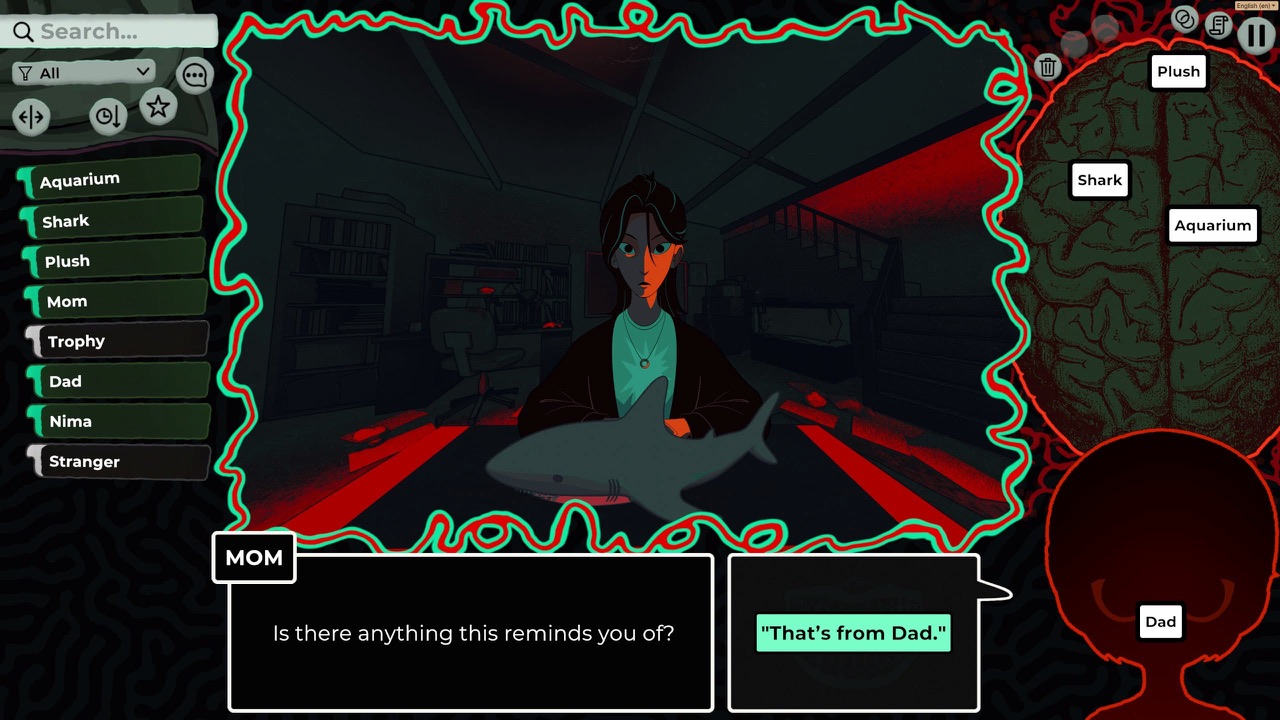
Available Choices is a filter for the word library. During a test, it displays only the words that are usable in the current conversation. Everything else is hidden so you can see your options at a glance.
The feature comes from HO! Games’ September 5 update for the full release. It is listed alongside two other new tools: favourites and a history of your last 20 combinations. All three are meant to make a large vocabulary easier to manage.
How to Use It Step by Step
The filter is meant for the moment Mom asks you a question. These steps follow the developer’s description and the documented demo controls.
- Wait for Mom to ask a question during a test.
- Open the Available Choices filter in the word library.
- Read the shortened list of words you can say.
- Drag your chosen word to the dialogue target to speak it.
It Narrows Options, It Does Not Choose for You
The filter only shows which words are eligible. Selecting a response is still up to you. Different eligible words can lead to different dialogue.
That matters because your answers shape the story. In the demo’s congee test, a plain food reply and a Disgust reaction lead to different conversations. The filter would show both options; you decide which to say.
Why the Filter Helps
The full game has more than 230 unique words and more than 5,000 ways to combine them. With that many words, finding the few that fit a question can take a long time. The filter cuts the list down to what matters in the moment.
Tile eligibility changes from question to question, according to the official store description. A word you used earlier might not be accepted now. Available Choices takes the guesswork out of that.
How the Demo Handled This
The public demo did not have the named Available Choices filter. A demo player reported that usable words were visibly highlighted instead. Demo walkthroughs describe dragging one of those words to the dialogue target.
So the core action is the same in both versions: pick an eligible word and drag it. The full-game filter adds a quicker way to find those words. Demo footage, such as Retcon Raider’s October 2026 run, shows the ordinary word-to-dialogue step.
Favourites and Combination History
Two other full-game tools work well with the filter. Favourites let you mark words you want to keep within easy reach. The history screen keeps your last 20 combinations so you can retrace your experiments.
If the filter shows nothing useful, you probably need a new word. Go back to exploring and combining, then try again. Our word combinations page lists verified recipes that may help.
Available Choices at a Glance
The key points, based on the developer’s September 5 update and the store description.
- What it is: a filter in the word library.
- When to use it: during a test, after Mom asks a question.
- What it shows: only words usable as dialogue options right now.
- What it does not do: choose the answer for you.
- Available in: the full game, launching November 27, 2026.
When the Filter Helps Most
Early on, your library is small and the filter matters less. As you explore more rooms and combine more words, the list grows quickly. That is when narrowing it to eligible words saves the most time.
The full game also has seven extra tests found through deeper play, according to the developer. When you suspect one, the filter can show whether any of your words fit. See the hidden tests page.
What Is Not Verified Yet
The exact location of the filter button in the interface was not verified before launch. The official developer overview covers word-driven tests, but the indexed video does not confirm where the button sits. We describe it as part of the word library because that is where the developer places it.
We will add a screenshot and exact steps once the full game is out on November 27, 2026. Until then, the steps above follow the official description. For general controls, see the beginner guide.
Frequently Asked Questions
What is Available Choices in Am I Nima?
A full-game filter that shows only the words you can use as dialogue options during a test.
Does Available Choices pick the answer for me?
No. It narrows the list to eligible words; you still choose which one to say.
Is Available Choices in the demo?
The named filter was announced for the full game. In the demo, players reported that usable words were highlighted instead.
Official Gameplay Trailer
Sources and Further Reading
- HO! Games — September 5 release and development update (Steam News)
- Am I Nima — official Steam store page (app 3224600)
- Nima Archive — chapters and tests
- Nima Archive — demo walkthrough
- Steam Community — demo observations and predictions
- GameTrailers — official developer overview (June 9, 2026, YouTube)
- Retcon Raider — demo playthrough (October 17, 2026, YouTube)