
The Three Things You Do in Every Scene
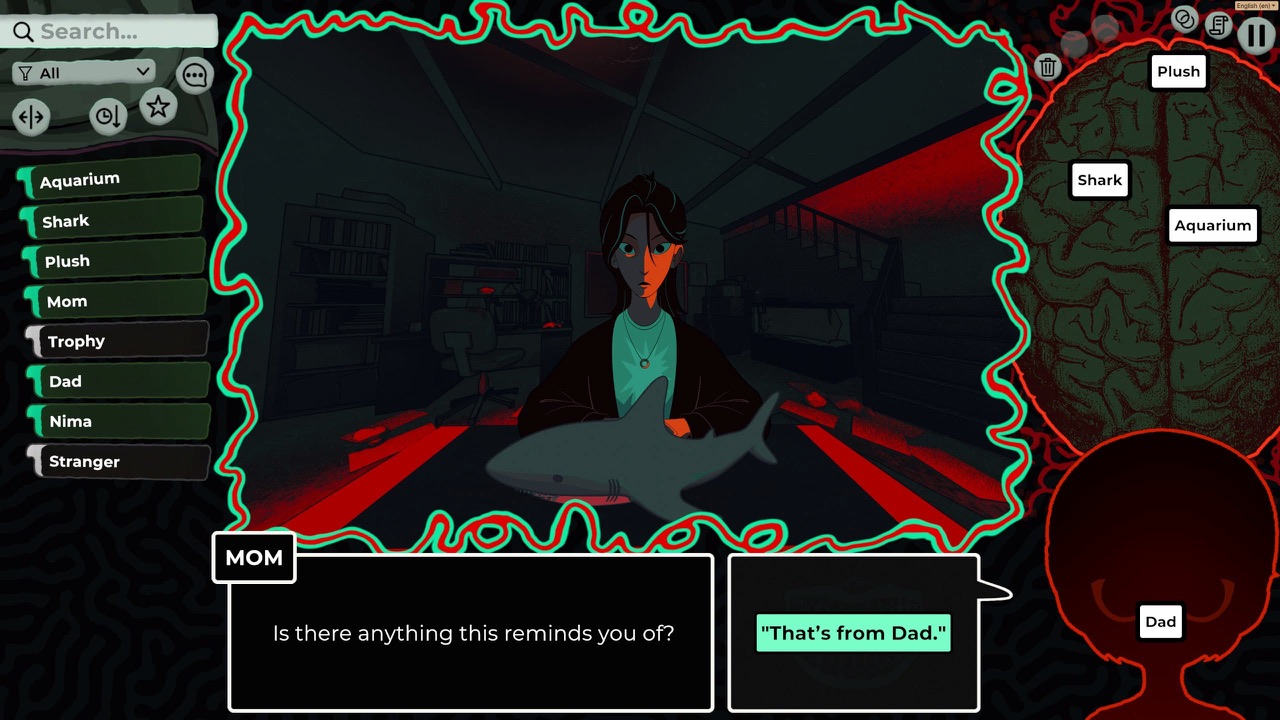
The Steam store page describes three recurring tasks, and every part of the game is built from them. First you find words by inspecting the things around you. Then you combine those words to unlock new meanings or buried memories. Finally you decide what to tell Mom when she questions you.
Keeping this loop in mind makes stuck moments easier to solve. If no answer fits Mom’s question, you are usually missing a word, not a trick. Go back to the room, look again, and try new pairs before you reply.
- Find — click objects to add words to the word library.
- Combine — pair two words in Nima’s mind to create a new word or memory.
- Answer — drag an eligible word to the dialogue target to speak it.
Your First Combination: Nima + Stranger
The opening hands you two starting words, Nima and Stranger. Combine them to make Mom, then use Mom as your response when the woman in front of you expects to be recognized. This is the game’s tutorial, and it teaches the drag-and-combine motion you will use for the rest of the story.
Right after that, try Mom + Nima. In the demo this pair produces Family, Fear and Love, which shows an important rule early on: one pair can create several words at once. Different pairs can also lead to the same word, so the library grows in more than one direction. Our word combinations list collects every verified demo recipe.
How to Speak a Word
To answer, drag an eligible word toward Nima’s mouth or the dialogue target. Not every word works for every question, because tile eligibility changes with what Mom is asking. A demo player reported that usable words were visibly highlighted, which helps when your library gets long.
Your choice matters. Words you collect or create can steer the conversation in a different direction. In the opening meal, for example, a plain food reply and a Disgust reaction lead to different dialogue. See the congee test guide for both documented routes.
Inspect Everything Before You Move On
In exploration scenes, click objects such as books, photographs and toys before you advance. The demo bedroom is the best example. The pet fish, the plush toy and the books all add vocabulary and story clues, and the official store page names locked furniture and handwritten notes as typical environmental clues.
Some of what you find is optional. The old locker beside the bedroom desk opens with the code from our locker code guide, and a banner and a book in the same room lead to the optional Obsession memory. None of these are required to finish the demo, but they add context you will not get otherwise.
Library vs. Mind: Where Words Live
Two interface areas do different jobs. The library stores every word you have discovered. The mind is where you place two words to combine them and see what they become.
Hands-on previews from Quest Daily and CtrlAltNoob both describe experimenting in the mind as the way to find new dialogue and learn about Nima. A good beginner habit is to focus on the next question first. Come back to optional recipes when you are curious, rather than trying every pair before you speak.
Full-Game Tools That Make Tests Easier
HO! Games’ September 5 update lists three tools added for the full release. Favourites let you mark words you use often. Available Choices is a filter that shows only the words you can say in the current test. A history screen keeps your last 20 combinations.
Available Choices is the one to learn first. Open it during a test to narrow the library to speakable words, then pick your answer as usual. Our Available Choices guide explains what the filter does and what is still unverified about it.
How Big the Full Game Is
The developer gives clear totals for the finished game. It spans five chapters with more than 15 tests, plus seven extra tests you can discover through deeper play. It has over 230 unique words, not counting the joke Tomato Boy words, and more than 5,000 ways to combine them.
The story branches, and the English announcement lists 11 endings. The public demo covered Chapter 1 and about half of Chapter 2, so most of that content is new. Our hidden tests page and endings guide track what is confirmed.
Beginner Mistakes to Avoid
Most early frustration comes from moving on too quickly. These habits come from the demo walkthroughs and hands-on accounts, and they apply to the full game’s larger rooms as well.
- Leaving a room before clicking every object you can interact with.
- Assuming one pair only gives one word; check the result tiles after each combination.
- Forgetting optional follow-ups, such as asking Mom about the swimming incident during the meal.
- Treating demo recipes as a full-game list; the retail word set is much larger.
Where to Go Next
If you want the scene order, follow the Am I Nima walkthrough. If you only need help with one puzzle, jump straight to the locker code or word combinations. For release timing, see the full release date page.
The full game is scheduled to launch on Steam for Windows PC on November 27, 2026. This guide covers the opening systems as shown in the demo and the developer’s announcements. We will expand it once the retail chapters can be played and checked.
Frequently Asked Questions
What is the first word combination in Am I Nima?
Combine Nima + Stranger to make Mom, then speak Mom in the opening conversation.
How do I answer Mom’s questions?
Drag an eligible word from your library toward Nima’s mouth or the dialogue target. In the full game, the Available Choices filter shows only the words you can use.
Can one combination create more than one word?
Yes. In the demo, Mom + Nima produces Family, Fear and Love from a single pair.
Do I need to find every word to finish?
No. Several discoveries, such as the locker diary and the Obsession memory, are optional story content in the demo.
Official Gameplay Trailer
Sources and Further Reading
- Am I Nima — official Steam store page (app 3224600)
- HO! Games — September 5 release and development update (Steam News)
- Nima Archive — demo walkthrough
- Am I Nima Wiki (aminima.skin) — starter word combinations
- Quest Daily — hands-on Am I Nima demo preview
- CtrlAltNoob — hands-on demo impressions
- Steam Community — demo observations and predictions
- ManlyBadassHero — demo playthrough (February 24, 2025, YouTube)
- GameTrailers — official developer overview (June 9, 2026, YouTube)